Custody of Exchange Funds
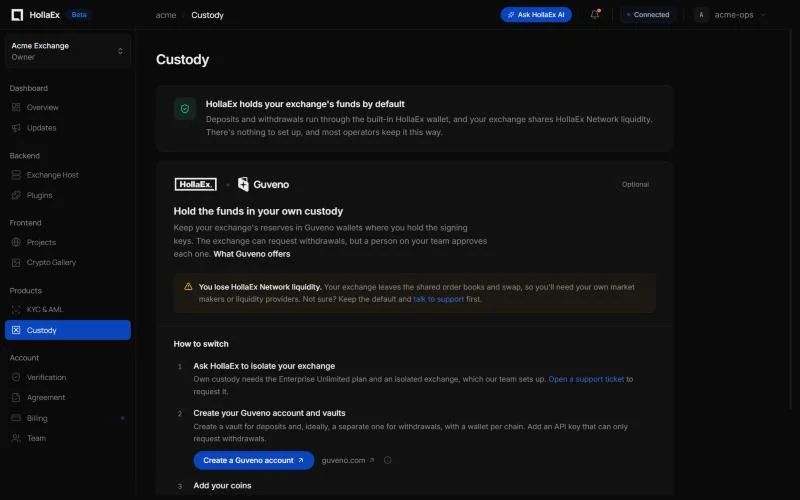
Guveno, Cobo, HexTrust and others are compared in Custody options.
Who holds my exchange's funds by default?
By default, custody is handled by HollaEx. Every exchange on the HollaEx Network comes with HollaEx's built-in exchange wallet. It processes deposits and withdrawals between your exchange and your users' wallets automatically, and you don't need to set anything up. Balances and user accounts are visible in Operator Controls.
Most operators keep this default. It's the simplest option, and it keeps your exchange connected to HollaEx Network liquidity.
Can I use my own custody instead?
Yes. If you want to hold your exchange's funds in your own custody, HollaEx offers this as a service. The recommended provider is Guveno, the custody option that is fully integrated with HollaEx exchanges.
Guveno is a self-custody platform for businesses that hold crypto:
- Keys stay yours. Wallets are derived and transactions are signed in your own browser. Guveno stores only the encrypted key file, never anything that can spend on its own.
- Reserves off the hot wallet. Funds your exchange isn't actively settling can sit in wallets kept apart from the exchange's own hot wallets and operators.
- Chains supported: Bitcoin, Ethereum, BSC, XRP, Tron and Polkadot, including native coins and tokens.
- API, webhooks and SDKs: address generation, balances and withdrawals over a REST API with scoped keys, webhooks that retry delivery, and Node and Python SDKs.
To find out whether the Guveno integration is available for your exchange and plan, open a ticket from your HollaEx dashboard.
How do I get started with Guveno?
Open the Custody page in the dashboard sidebar (under Products): dash.hollaex.com/custody.
From there, click Create a Guveno account. Guveno accounts are separate from your HollaEx account: you sign up and sign in at guveno.com, not with your HollaEx login. When you open Guveno from the Custody page, your account is tagged as a HollaEx referral.
Connecting Guveno to your exchange takes a few steps:
- Plan and network setup. Contact HollaEx support to confirm own custody is available for your exchange. The HollaEx team sets your exchange up as an isolated exchange (outside the public HollaEx Network) and assigns its asset identifier. You can't make this change yourself from the dashboard.
- Prepare Guveno. In your Guveno company, create one vault for deposits and, recommended, a separate vault for withdrawals, with one wallet per chain you want to custody. Create an API key for the exchange with the request-only withdrawal permission (
withdrawals:request, notwithdrawals:create), so the exchange can never move funds on its own. - Create your coins. In Operator Controls, create each custodied coin as type
externalon its network. - Install the Guveno plugin. In Operator Controls → Exchange → Plugins, install Guveno and fill in the API URL, API key, webhook signing secret and vault names.
Once it's running, user deposit addresses come from your Guveno wallets, and deposits are credited after Guveno confirms them. Withdrawals are sent to Guveno as requests that a person on your team approves in the Guveno dashboard. The exchange holds no keys and can't move funds by itself.
What's the downside of using my own custody?
You lose access to HollaEx Network liquidity. To use your own custody, the exchange must run as an isolated exchange, outside the public HollaEx Network. It no longer gets the shared order book liquidity for common pairs such as BTC/USDT and ETH/USDT, or HollaEx Network Swap liquidity.
With your own custody, you'll need to supply liquidity yourself, for example with market makers, external liquidity providers or your own trading bots.
Before you switch, weigh full control of your keys against the liquidity your exchange currently gets from the network. If you're unsure, keep the default HollaEx custody and talk to support first.
Can I use a custody provider other than Guveno?
Guveno is the recommended, fully integrated provider. HollaEx also has custody plugins for Cobo and HexTrust. Other providers (for example Fireblocks or BitGo) may be possible for vetted teams with dedicated technical staff. To find out whether Cobo, HexTrust or another provider is available for your exchange, open a ticket from your HollaEx dashboard. Every other provider carries the same trade-off: you lose HollaEx Network liquidity.